Solution Keynote Template: Design Presentations That Connect
Every great idea deserves a stage, but how you present it often determines whether it lands or gets lost. You might have groundbreaking data, a revolutionary product concept, or a compelling brand story, but if the delivery feels disjointed or uninspired, the message suffers. This is where the right presentation design becomes crucial. The Solution - Keynote Template is built for exactly this scenario—a premium font and design asset system that helps professionals transform complex information into clear, engaging visual narratives. It’s not just about making slides look good; it’s about creating a cohesive experience that guides your audience from curiosity to understanding.
More Than Just Slides: A Visual Communication Toolkit
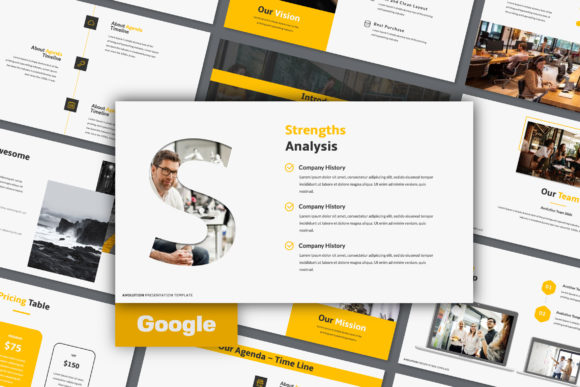
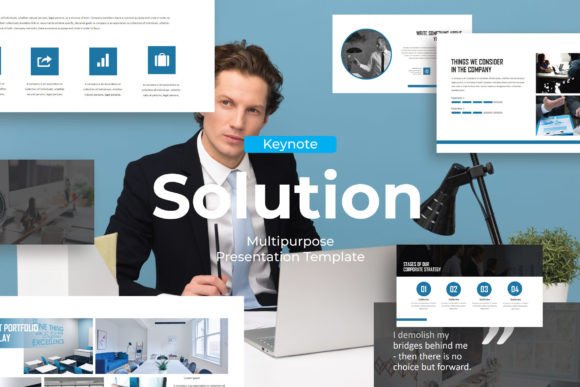
At its core, Solution is a modern typography and layout system designed for Keynote. Its visual personality strikes a balance between professional clarity and creative energy. You’ll find clean lines, thoughtful whitespace, and a curated mix of sans serif font styles that ensure readability at a glance. The template avoids overly decorative flourishes, focusing instead on structure and hierarchy—key elements for any brand identity or editorial design project. The included vector based icons and picture placeholders are designed to work seamlessly with your own content, allowing for a drag and drop image workflow that saves hours of manual adjustment.
This isn’t a one-size-fits-all clipart collection. The design approach is intentionally versatile. Whether you’re a startup founder pitching investors, a marketer outlining a campaign, or an educator breaking down a complex concept, the template provides a structured yet flexible canvas. The professionally designed slides cover a range of layouts—from data visualization to team profiles, from timelines to quote callouts—each built with visual hierarchy in mind. The goal is to help you present information in a way that feels logical and effortless for your viewers.
Where This Template Truly Shines
The strength of a good design asset lies in its adaptability. Solution excels in scenarios where clarity and professionalism are non-negotiable. For entrepreneurs and small business owners, it’s ideal for investor decks, client proposals, and internal strategy meetings. The consistent use of modern typography and structured layouts helps build brand perception as organized and credible. Marketers and content creators can use it to craft social media strategy presentations, campaign post-mortems, or influencer partnership pitches that need to look polished under tight deadlines.
For those in editorial design or publishing, the template offers a clean framework for presenting book concepts, magazine layout proposals, or content calendars. The easy color change feature allows you to quickly align the entire deck with existing brand guidelines, ensuring consistency across all touchpoints. Designers and bloggers will appreciate how the picture placeholder system works with high-quality imagery, letting the visuals take center stage without fighting the layout. Even for personal projects—like planning a community event or outlining a creative hobby business—the template provides a professional backbone that elevates the presentation.
Practical Guidance for Using Solution Effectively
Adopting a new template is about more than just swapping out text. To get the most value from Solution, start by evaluating your project’s core message. What is the single most important idea your audience needs to walk away with? Use the template’s strongest layouts—often the title slide, key data visualization, or summary slide—to highlight that point. The font pairing within the template is already optimized for readability and visual hierarchy, so resist the urge to introduce too many external typefaces. Sticking with the included sans serif font styles will maintain that clean, professional feel.
When incorporating your own images, leverage the drag and drop image placeholders to maintain consistent margins and alignment. This small step prevents a cluttered look and keeps the focus on your content. For color, use the easy color change feature to apply your brand’s primary and secondary palettes systematically. Don’t just change the background; update accent colors on charts, icons, and text highlights to create a unified brand identity throughout the deck. If you’re presenting data, choose the slide layouts designed for charts and graphs—they’re built to make numbers understandable without overwhelming the viewer.
Finally, remember that a template is a starting point, not a rigid cage. The easily editable nature of Solution means you can adjust layouts, combine elements from different slides, or tweak spacing to better suit your content flow. Always preview your presentation in full-screen mode to check for readability from a distance. Are the key takeaways legible from the back of a room? Does the visual flow guide the eye naturally from one point to the next? This practical testing is what transforms a good-looking deck into an effective communication tool.
The Real Value: Clarity, Confidence, and Connection
Ultimately, the purpose of a tool like the Solution - Keynote Template is to remove friction from the presentation process. When you’re not wrestling with alignment issues or font mismatches, you can focus on what truly matters: your story and your audience. The professional and modern designs provide a credible backdrop that lets your ideas take center stage. For designers, it’s a time-saving asset that maintains high standards. For entrepreneurs and marketers, it’s a way to present with confidence, knowing the visual foundation is solid.
In a world saturated with information, how you present your ideas can be a significant differentiator. A well-structured, visually coherent presentation does more than just display information—it builds trust, enhances audience engagement, and makes your message more memorable. By choosing a thoughtfully designed system like Solution, you’re investing in the clarity and impact of your communication. That’s a practical advantage that resonates in boardrooms, classrooms, client meetings, and beyond.