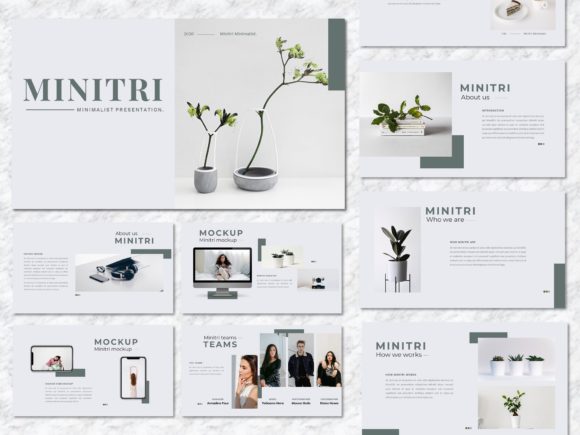
Minitri – Creative Business PowerPoint Template
Creating a presentation that truly stands out often feels like a battle against time and generic templates. You need something that looks polished, modern, and professional without spending hours tweaking every slide. This is where the Minitri – Creative Business PowerPoint Template steps in, offering a solution that balances creative flair with corporate clarity. It’s designed for people who need to communicate ideas effectively, whether they’re pitching a new venture, showcasing a portfolio, or outlining a marketing strategy. The template’s strength lies in its versatility and clean aesthetic, making it a reliable tool for a wide range of professional needs.
A Design Built for Clarity and Impact
At its core, Minitri presents a minimalist yet warm visual personality. It avoids overly complex graphics or distracting animations, focusing instead on strong typography, ample white space, and a cohesive color palette. This approach ensures your content takes center stage. The style is decidedly modern, with a slight creative edge that prevents it from feeling sterile. It’s the kind of template that conveys competence and attention to detail—qualities that directly influence how your audience perceives your brand or project. The overall appeal is professional confidence, making it suitable for boardrooms, client meetings, and creative reviews alike.
The template’s structure is based on master slides, which is a practical feature for maintaining consistency. When you update a style element on the master slide, it cascades through the entire deck. This saves a significant amount of time and ensures your visual hierarchy remains intact from the first slide to the last. The 16:9 widescreen ratio is now standard for most displays and projectors, so your presentation will look as intended without awkward cropping or black bars. Every graphic element within Minitri is resizable and editable, giving you complete control to adapt it to your specific brand colors or content requirements.
Where This Template Excels
Think of Minitri as a flexible canvas. Its design assets are well-suited for creative studios and agencies presenting case studies or campaign proposals. For startups, it provides the perfect framework for a pitch deck that needs to communicate vision and viability without overwhelming potential investors. Corporate teams can use it for internal reports, quarterly reviews, or training modules, benefiting from its clean layout that makes complex data easier to digest. The template includes slides tailored for marketing promotions, branding guidelines, and portfolio showcases, making it a practical toolkit for designers and marketers.
Photographers and artists will find the image placeholder feature particularly useful. You can simply drag and drop your visuals into designated frames, which automatically scale them to fit without distortion. This makes building a visually driven portfolio presentation straightforward. Bloggers and content creators can leverage it for media kits or partnership proposals, while small business owners might use it for product launches or service overviews. The key is that Minitri doesn’t force a single narrative; it provides a professional structure that you fill with your own story.
Practical Guidance for Using Minitri
Before diving in, take a moment to evaluate if Minitri aligns with your project’s tone. Its modern, slightly creative style works best for audiences that appreciate contemporary design but still expect a level of formality. It might not be the ideal choice for a very traditional, conservative industry where ultra-classic templates are the norm. However, for the vast majority of modern business and creative contexts, it strikes an excellent balance.
When working with the template, pay close attention to font pairings. Minitri uses recommended free web fonts, which is a practical advantage—it means your presentation will look consistent even if you share the file and the recipient doesn’t have premium fonts installed. Test how your chosen fonts render at different sizes within the slides. Your main titles need to be legible from a distance, while body text should be comfortable to read on a screen. The template’s layout already establishes a visual hierarchy, so respect that structure when adding your content. Avoid cluttering slides with too much text; let the ample white space work for you to maintain focus.
Use the documentation file included. It often contains valuable tips on editing master slides, replacing images, and modifying color schemes efficiently. Since all images in the demo are for preview only, you’ll need to source your own visuals. Choose high-quality, relevant images that complement the template’s clean aesthetic. Consistency in your image style—whether it’s color treatment, subject matter, or composition—will significantly enhance the professionalism of your final presentation.
Finally, remember that a template is a starting point. Minitri – Creative Business PowerPoint gives you a robust and attractive foundation, but the final impact depends on your content and how you adapt the design to fit your unique brand identity. Take the time to customize it thoughtfully, and you’ll have a presentation that not only looks sharp but also communicates your message with precision and style. It’s a practical design asset that, when used well, can elevate your professional communications and help you make a memorable impression.